Creating Maintenance Parts Inventory Locations
The Maintenance Parts Inventory Locations option allows users to create records of locations where the inventory parts are stored in the property.
Breakpoint: 70055 - Maintenance Parts Inventory Locations (Front Office - Housekeeping)
Perform the following steps to create a record for the inventory location:
Navigate to Settings à Maintenance Setup à Maintenance Parts Inventory Locations.
Click Create Maintenance Inventory Location. The Create Maintenance Inventory Location screen appears.
Refer to the following table and fill in the fields:
|
Field |
Description |
|---|---|
|
Location Code |
A unique code to identify the inventory location. Up to 15 alphanumeric characters are supported. |
|
Location Description |
The name of the inventory location. Up to 50 alphanumeric characters are supported. |
|
List Order |
The position in which the inventory location must appear in the grid. By default, the system automatically generates a value based on the value of the previously created list item. Values up to 999 are supported. |
|
Active |
When enabled, it indicates that the inventory location is active. |
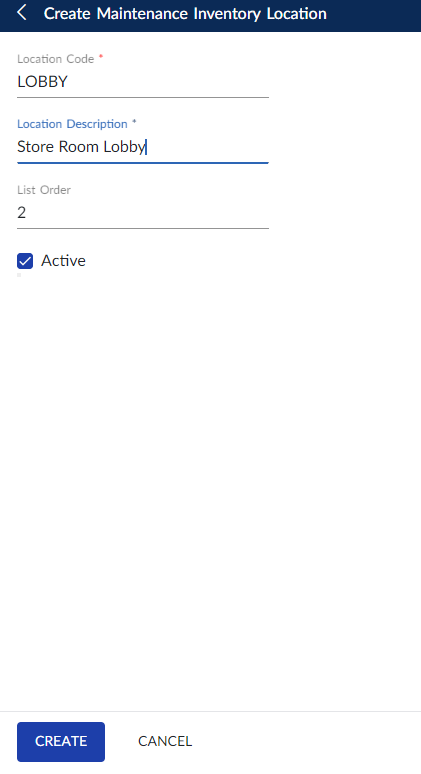
Click Create. The record for the inventory location is created and displayed in the grid.
Users can also perform the following actions in the Create Maintenance Inventory Location screen:
-
Modify the details of the maintenance inventory location using the Edit icon.
-
Delete the maintenance inventory location record using the Delete icon.
-
Drag the maintenance inventory location record to change positions within the grid using the Drag icon. The list order number is automatically updated after the change in positions.
-
Search for the maintenance inventory location record using the code or name.
-
Print the maintenance inventory location details using the Print icon.